
MrMagic
-
Posts
207 -
Joined
-
Last visited
-
Days Won
1
Everything posted by MrMagic
-
This website seems to show the system a little better (or an earlier version) - http://www.kenon-digi.com/products.php?productId=14 From what I can see each downlight would have it's own network cable back to a PoE enabled network switch, your total power would then be limited by the capabilities of the PoE switch. With corporate gear you can push the full 25 watts per port (i.e. per downlight) - home equipment tends to have the total PoE capacity shared between a few ports so you may only be able to put a few downlights on each network switch. It's certainly an interesting concept, I've seen it done in datacenters before, saves having to run in any lighting circuits and you've got oodles of catX cabling handy. I expect it's pricey tho - a quick google shows list price of £200 approx per downlight!!
-
The Harmony works alright with voice but you do have to phrase things perfectly for it to work... "Hey Google, Turn on the kitchen TV" "Hey Google, watch BBC ONE on the kitchen TV" (provided you have it set up as a favourite in Harmony) "Hey Google, change the channel to one-zero-one on the kitchen TV" My wife always says 'television' instead of TV, it seems to find that harder to process. Thankfully its a bit more tightly integrated, previously you had to say "Hey google, ask harmony to..." (same phrases for Alexa). Agreed - there is a market for simple tech for the older folk.
-
@vfrdave Yep thats correct @pocster I was using Indigo previously - super simple to use, I only gave up as I got fed up paying for the major upgrades (cheap skate me). Much easier to set up complex automations tho via the Gui rather than writing scripts in Home Assistant (although its getting better all the time)
-
@lizzie Looks neat, thanks for sharing the pics. Will be different to mine as two different systems (Dynalite vs ZWave/Fibaro) plus mine normally has a lid on it - not much fun just looking at a grey box ?. Similar 'star' wired setup, all control elements in a central location for easier swap out of failed components / switching systems if needed. @PeteTheSwede For CCTV I use Hikvision, cameras + NVR, it 'just works'. For the AV side of things I agree with your thought process - I went through a similar plan to centralise all AV kit in a shiney rack but in the end it seemed to cost more and was more hassle than having a stack under each TV. For me each TV gets the same Freesat box + Roku combo. Add on a soundbar if it's in the lounge.
-
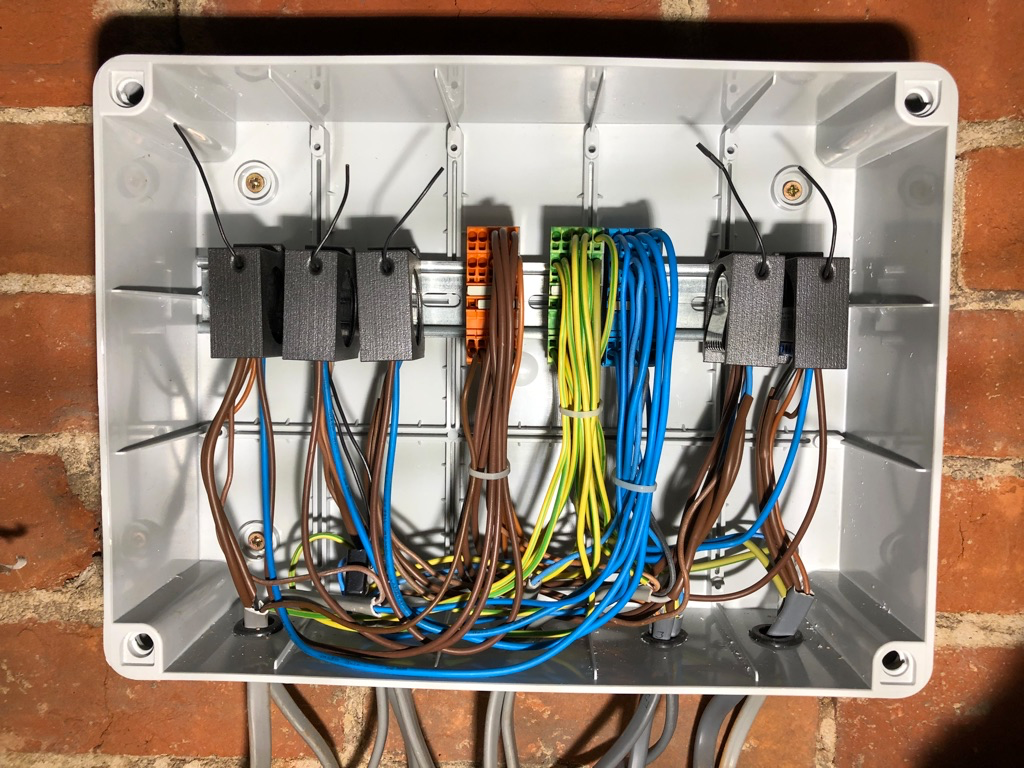
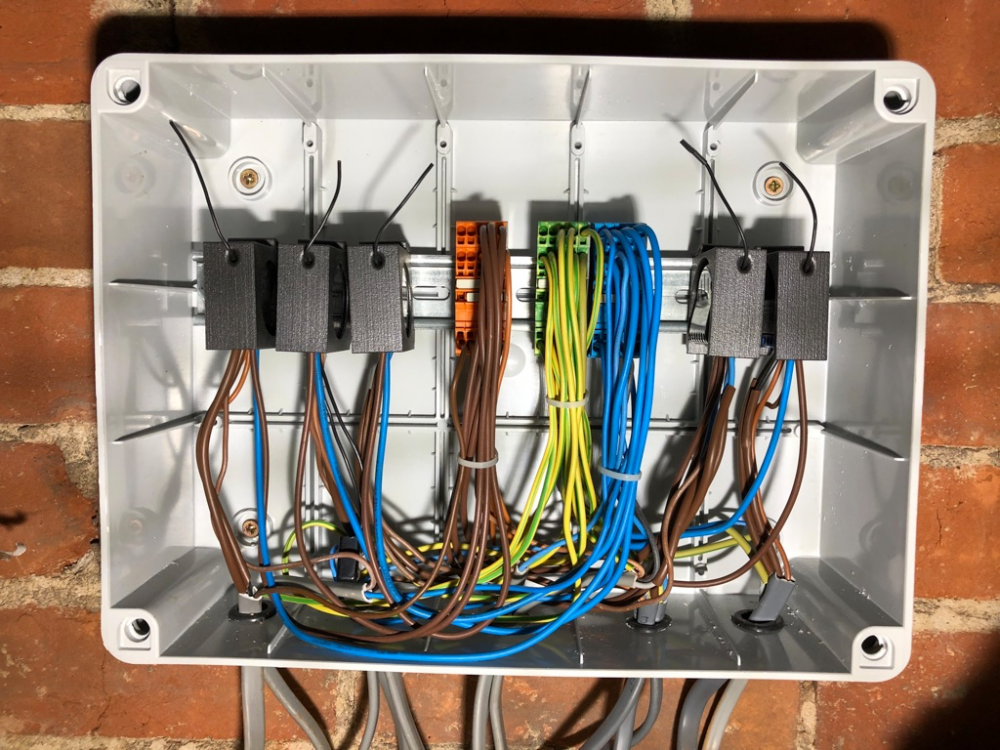
Heres an example of a wiring point (this one covers upstairs). It's not pretty so you may want to avert your eyes if you are of a nervous disposition... Essentially you've got power in, a 3C+E from each switch point and then T&E out to each lighting set. This one also does the bathroom fan. I expect @jack can post some pictures of a properly wired Loxone system to show how it should be done. N.B - This looks horrible, please please don't copy. If in doubt get a qualified spark in etc etc.
-
@jack Loxone was next on my list of things to try (had I not gone with zwave). A really good looking system and they seem more 'open' @Adam2 Home center can go wherever in the house. I ended up with 3 wiring points - 1 does upstairs, 1 does downstairs (front) and another downstairs (back). Standard T&E cable to the lights, ran in 3core+E to the light switch positions to give me options. Perfectly acceptable to use a PIR, If I was doing it again I'd probably go for either PIR or dusk sensing low level lights in the bathrooms. Decent hotels are a good place to see some of this in action / get inspiration. Also be realistic about how much automation you want/need - it's all very snazzy but for me I probably use about 10% of the functionality. Things I like - - shouting at Google to turn lights on if hands are full - Scheduling outside lights on/off based on sunset/sunrise times rather than fixed times - Randomly turning lights on/off when on holiday - Automatically turning on 'mood' lighting (table lamps etc) before dusk - Turning off everything from bed (lazy) In addition to ZWave for lighting I've also gone with Honeywell Evohome for heating, Google Home ("smart" assistant) for shouting at & casual music listening, ROKU sticks attached to dumb TVs for all on-demand & catch up services, Logitech Harmony remotes - all of this aligned with the mantra of making the smart elements modular and easy to swap out. This is the combination that works for us... but try them out, order one product, try it, remember you've got to live with it (and the wife/significant other) and that its a £££ investment so you don't have to get off your backside to switch a light on/off ?
-
Just to add - I've also gone the same route as @AliG - I chose to 'star'/radial wire everything back to a central point and then install all the dimmers in a central box. My reasoning was that if I ever wanted to switch away from Fibaro I could either just join the wires together to make it act like a regular dumb light and switch or put in different dimmers from another manufacturer. I've got - Fibaro Dimmers - Lounge, Kitchen x 2, Playroom, Bed 1, Bed 2 Fibaro Relays - Worktop Lights, Outside Lights, Landing Lights, Bed 3, Bathroom Fan Plug in dimmers - TKBHome x 2 Plug in relays - TKBHome x 1 The Fibaro dimmers are quite nice in that they have a "B" switch input... so in the lounge and bedroom I've put a 2 gang switch in, 1st one does the ceiling lights and the 2nd one does the "B" input which tells the dimmer to send a command to some extra plug in dimmers I have for table lamps, bedside lamps etc. You get all the benefits of those 5 amp lighting socket but without having all the extra wiring and fixed positions. (hopefully this makes sense, harder to explain in writing). All of this works without the 'brain' as such but I'm also using Home Assistant (https://www.home-assistant.io/) to integrate with other services and Alexa/Google assistant. The Fibaro Home Center is better if you want less tinkering. Same as AliG - switches work every time, app works 95% of the time. Switches also get 100% wife approval factor. - I think I went for a slightly different switch to AliG - I'm using the MK 4885WHI which is a single push switch, not a two position one. @AliG - re: Having to move homecenter to add new modules - this is correct. When you put the modules in inclusion mode they only transmit at low power, this is to reduce the risk of you or someone else including them in their network by mistake. I'm using the Aeotec ZStick which is quite nice as it has a battery backup so I can pull the stick out and put it right next to the new module when including then plug it back in to my raspberryPi. All the above sounds quite complex but I found it a really easy system to work with (DIY & IT confident). Good online community as well. The drawback with some of the more proprietary systems (Rako, Lutron etc) was that you had to be a paid up installer to get access to the manuals and secrets. Purchased from Vesternet - https://www.vesternet.com/
-
As @Nickfromwales mentioned, you *should* be able to do this with Zwave using 'direct association'. I do something similar to this in a few rooms where I have a Fibrao dimmer unit switch on some table lamps as well. I'm not sure if you would be able to set this up without a controller (even temporarily just to do the initial config)....the manuals have all been updated and I can't find the procedure for how I did this a few years back.. sorry! Edit - bit more info here under 'Associations' - https://www.vesternet.com/resources/technology-indepth/groups-scenes-associations/
-
It takes a while to perfect crimping, but before you crimp down always have a look at the connector end on - you should see all the ends of the wires pushed up against the plastic (or very close) and flip it over, look side on also, you can see how far wires are pushed in - its flippin' fiddly but you can always pull it back out and try again as many times as you want before committing (sorry I know this advice is stating the obvious) Also for general reference always wire to EIA/TIA 586B (just incase people aren't aware) Orange/White Orange Green/White Blue Blue/White Green Brown/White Brown

-
If you're planning the FTTPoD route then theres a ton of discussion about it over on TBB - http://forums.thinkbroadband.com/fibre/4604719-re-fttpod-desktop-quotes-and-final-prices.html Also someone has summarised the costs that people are being quoted here - https://docs.google.com/spreadsheets/d/1QFkK1sLBFQjlGgTwHKUI3aJSdNH-lgFsQ71SMxarWBA/edit#gid=0 - it's a multistage process so you can also see the varience between the initial quote and the final bill. Just to summarize the jargon as it can be confusing - FTTP/H - Fibre to the premises/home - usually on new builds but also rolling out across cities and some select rural locations. Proper fibre all the way to your home. Order via your ISP, "normal+a little bit more" cost FTTC - Fibre to the cab - what most people can access, what you will normally be using if you order "fibre broadband" from Sky, TalkTalk, BT etc, green cab down t'street (normally) has another one installed near it. Copper wire still from cab to house. Order via your ISP, "normal" cost FTTPoD - Fibre to the premises on demand - your area/exchange is fibre "enabled" but Openreach will quote for and build dedicated fibre infrastructure to your house (or group of houses). Order via selected ISPs, bespoke pricing depending on lots of factors ...plus all the other options depending on where you live - Virgin Media, Wireless, GFast, B4RN, Vodafone Gigafast, Hyperoptic, Gigaclear, etc etc etc. They don't make it easy...
-
Unfortunately its more cost but you would probably want to run some form of tunneling service over the top of the 3UK connection - this would terminate somewhere and give you the static ip you want and full control over ports inbound and outbound. An example of this would be the AAISP L2TP service - all your traffic to t'internet would route in/outbound via AA with your own static IP. https://aa.net.uk/broadband-l2tp.html Theres probably VPN providers out there also that could do similar although haven't looked at any of these before. You may or may not require additional hardware for this (i.e. another router).
-
Solar tubes (sun pipes), how much light do they let out?
MrMagic replied to Dreadnaught's topic in Skylights & Roof Windows
I believe I have seen one with an integral blind. Lovely, super simple bit of kit tho... fitted one on my previous house where we had an internal bathroom with no windows. Was amazing on a clear night how much moon light you got in the room. Hope you manage to get it fitted. -
hass io Anyone using Home Assistant
MrMagic replied to readiescards's topic in Networks, AV, Security & Automation
Agree with the sentiment about ensuring future proof where possible - I believe I've gone some way to achieving this by star wiring lighting to central points, i.e. the switch T&E and lamp T&E both go back to the central control point - should the smart stuff become obsolete/fail you can rip and replace with something else, failing that just patch the wires together to make it act like a normal switched light - the flexibility is there. Same for the heating - it's just smart TRVs, rip them off and just screw on a regular TRV. I looked at a lot of proprietary systems for lighting like KNX, RAKO, Lutron etc but most of those required some form of proprietary cabling at the switch point or some form of catX. In those instances, if it failed, you would have to find another smart system, you couldn't just pop on a normal switch, unless you ran T&E to the switch as well as the catX. @JSHarris Love the video - I don't trust smart locks, thats a step too far. Give me a good ol lock and key any time. One piece of smart tech I don't recommend are NEST Smoke Alarms (or any smart smoke alarm)... getting a notification on your phone that 'Smoke has been detected' when in America does not make you feel great. (luckily(?) it was a false alarm... !!!) @joe90 Thats a lovely doorbell -
hass io Anyone using Home Assistant
MrMagic replied to readiescards's topic in Networks, AV, Security & Automation
Yep, I'm a HA user - not really using it to full potential but it's a useful hub for bringing everything together. For me it's connected to - - ZWave via Aeotec usb stick - all lights in the house are zwave controlled - Weather (met office) - Climate - Honeywell Evohome - CCTV - pulling in images from a Hikvision system - Roku media players on all the TVs - Owntracks for device (people) location via MQTT client on phone - Ring doorbells - power level and last ding time - Generic REST endpoints - pulling in data from another RPi with CT clamps, solar stats being pushed in to a sensor In terms of automations I'm not really doing anything.. I just haven't had the time to sit down and fiddle. It's getting easier in the more recent versions but previously it was very yaml config heavy. At the moment its doing two main functions - 1 - remote control of the house when I'm away, make it look like someone is in etc 2 - data aggregation - it pulls from all the random sources and presents everything in a nice REST API that I can consume from other systems Check out Dr ZZZs on youtube for simple how tos on HA+Sonoff -
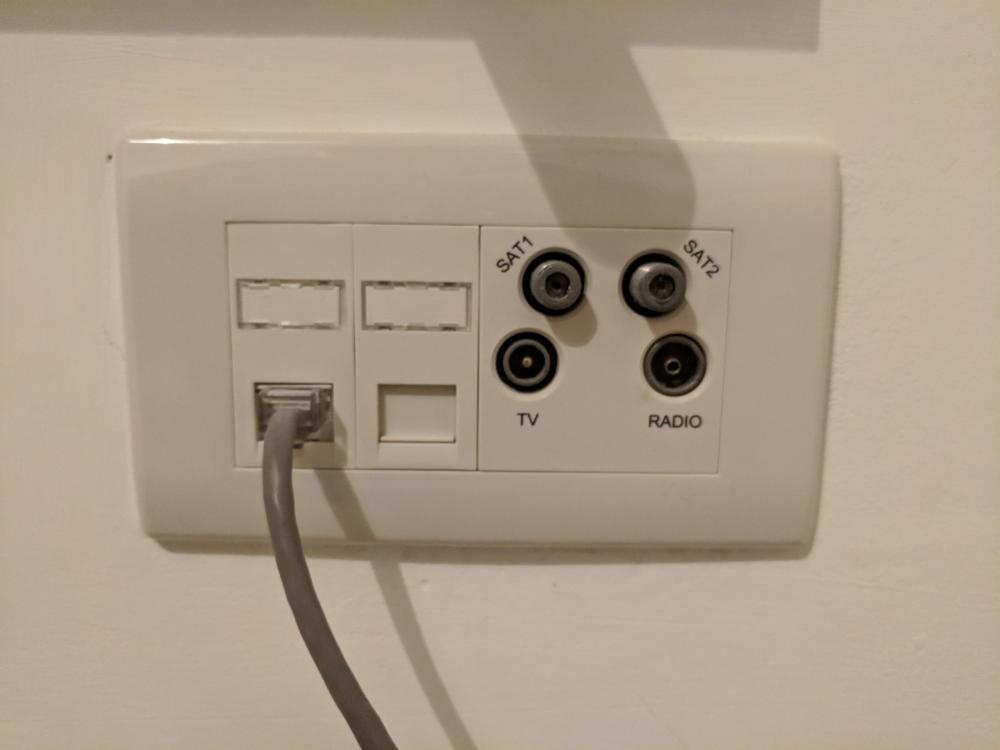
From your cupboard out to your TV points I'd certainly recommend a twin feed of WF100 (or equiv) and a pair of cat6a cables. This is what I've done to each Tv point - I've put them in to a quad plate with 1 x SAT, 1 x SAT/TV/FM (using a quadplex outlet) and then two cat6a outlets (cat5e in my case). Quadplexer - https://www.screwfix.com/p/lap-tv-fm-2-satellite-quadruplex-grid-module-white/31768 Edit - for some reason I didn't read the earlier replies re tri/quad plexing. so yes, for SkyQ you will need some additional sat only sockets. I guess you may only need to do this to you main TV point as the other SkyQ boxes all link over wifi/powerline/ethernet so don't actually need the sat feeds. You're only going to do it once so perhaps put in more to future proof!
-
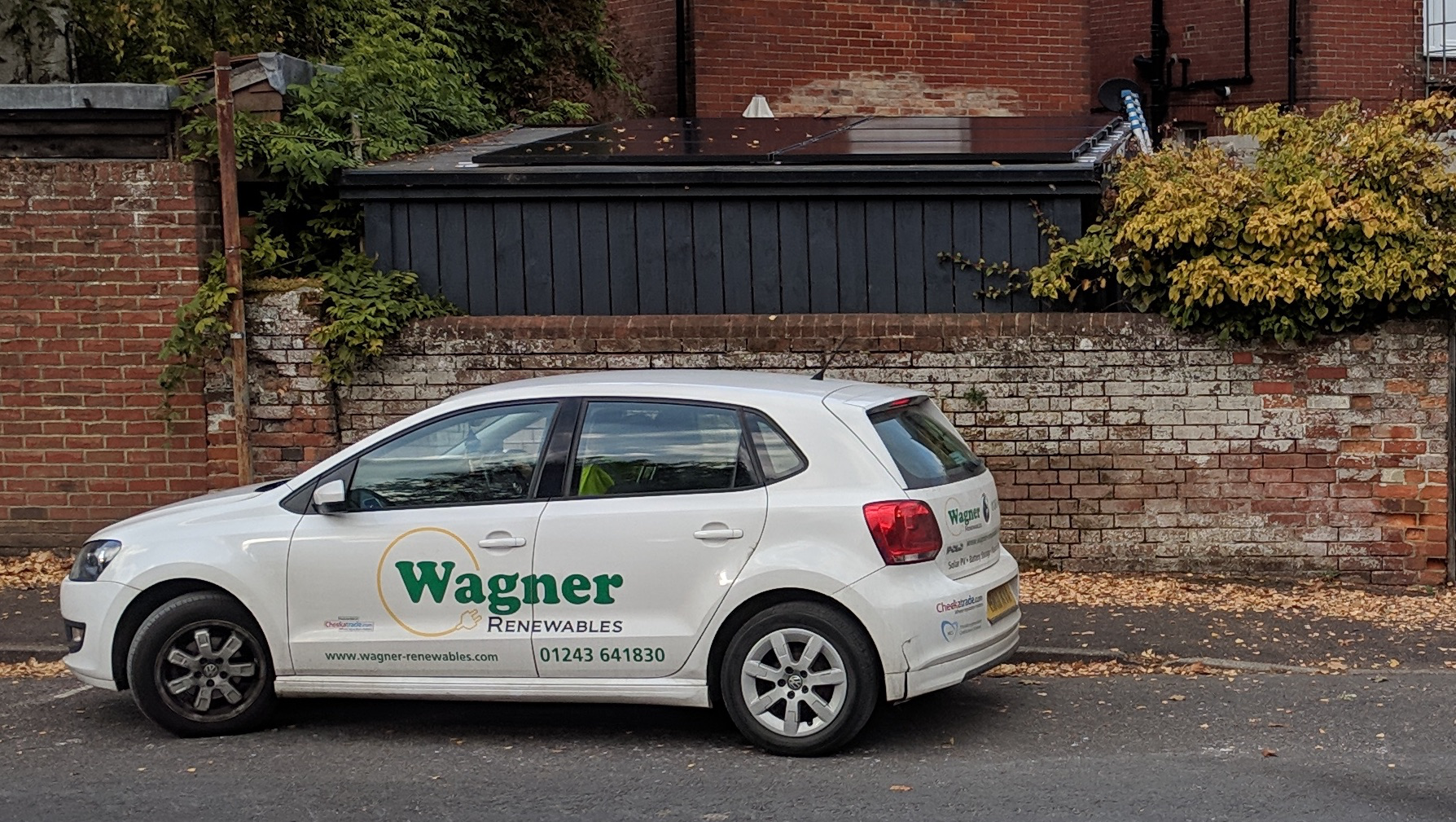
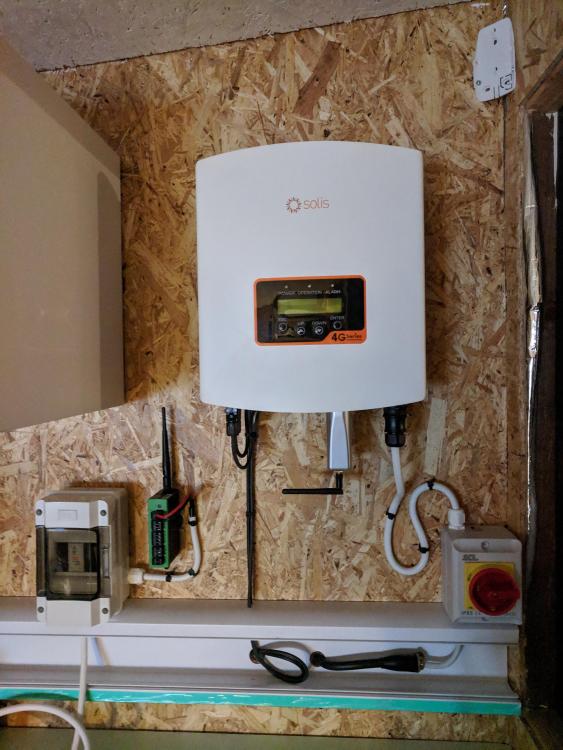
Hi all, I thought I'd do a little show and tell of my solar installation - a bit of background first, we're currently in the process of arranging a loft conversion (stalled due to party wall issues, but thats a story for another day). As part of this we thought we'd take the opportunity to get solar panels installed on the house roof. I spoke to a few companies but in the end chose Wagner Renewables - they've been mentioned and recommended a few times on the forum. They identified that my shed/office could also hold some panels as the house roof doesn't have the largest area. So today we had the shed installation done - chaps turned up bright and early, worked well, kept the work area tidy etc. They also identified that we could squeeze another 2 panels on the roof so hopped back in the van and went back to base to grab some more panels. The panels were installed on my shed roof which is EPDM on 18mm OSB. They used a simple bracket system which had neoprene seals and then roofing screws to directly screw in to the OSB - I must admit I'm a little nervous about the water tightness of it but the brackets are all under the panels so hopefully they won't be exposed to too much rain - the system is designed to be used with EPDM. Another chap worked on the interior fit out - installed a Solis 1.5Kw inverter and Tigo gateway and all the cabling. They are due back tomorrow to complete the electrical works but, so far, so good, very happy with the install.. hope it works! Once the loft conversion is underway we've got another 7 panels to get up on the main roof so the final system will be 13 x 300w panels - 3.9kWp Edit - just to add, I'm not connected to these guys in any way, just a normal customer.

-
Regarding the two use cases - For standard, long term meter readings - good ol Excel at the moment, manual monthly readings. Smart meters due to be fitted in the next few weeks. Live/graphed power usage - Loads of options for 'CT' clamp based monitoring but went for a simple Pi+Hat - http://lechacal.com/wiki/index.php/RPICT3V1 and http://lechacal.com/wiki/index.php/Raspberrypi_Current_and_Temperature_Sensor_Adaptor - I chose this one for simplicity, it presents itself as a serial device on the Pi which I can just open and monitor with a bit of python. This one also seems to be more accurate by reading the actual AC voltage from an AC-AC adapter (but the maths here is beyond me). I like the idea of a 5V bus - I'm getting to the point where I'm starting to use good quality multi port USB chargers now that USB is almost becoming defacto for low voltage peripherals.
-
Do you know the name of this brick bond?
MrMagic replied to leaven's topic in Bricklaying, Blockwork & Mortar
It doesn't appear to be very common, thats for certain. Google seems to think it's a 'block bond' but I wouldn't rely on that name when specifying. 5th down on this site - https://brickarchitecture.com/about-brick/why-brick/brickwork-bonds -
We've just chosen Dino Decking (silly name) for our next project, although we're using it for cladding a set of gates. Most of them offer a free sample service - an evening of googling and form filling pretty much hits all the suppliers.
-
Just a heads up - Mark from Wagner is currently working abroad. Full disclosure - I've purchased a system, got an install date later this month so currently neutral towards them.
-
Morning chaps - was made aware from the latest Fullycharged video that Powervault have launched a new set of batteries - has anyone obtained any quotes from them on the new PV3 product? I know a few people had looked at the original PV on here. R.
-
It's quite common to have the washer/dryer upstairs or on the middle floor in US houses (more common than over here anyway)... stayed in a few airbnbs that had this. If you live in a multistory 'house' it kind of makes sense - why cart it all the way downstairs only to bring it back up. Given the opportunity to do this I'd certainly give it some serious thought. I also like the laundry chute idea although £600 for that hose seems a little bit pricey. Perhaps look at a fire hatch from Jupiter blue and some aircon/HVAC duct or just make your own by boxing in?
-
In a similar situation at the moment - ordering some composite decking to use as infill on a new set of gates, can't be ars*d to maintain wood. 2.2m lengths were £50 delivery, try ordering 4m lengths and the delivery jumped to £150.
-
Same... they were good in the shop, said what I wanted, mixed it up no issues but the resulting colour was just not the same. We've done a lot of the rooms in Valspar - brought a F&B tester pot, good few coats on a nice bit of card then take it in to store to get it colour matched. Always comes out pretty darn close to the original.
-
Also a DIY Kitchens customer - super easy, fully assembled. One added bonus when I got mine (not sure if it's still the case) was that all the 'hardware' (door hinges, specialist openers etc) is 'Blum' and comes with something like a 25 year or lifetime guarantee. Just a pain that I think they've upped their minimum order amount to £750 otherwise I'd order more of it for other cabinetry projects around the house. Have been using IKEA instead which are also perfectly fine, just an extra step to assemble.