
joth
-
Posts
2918 -
Joined
-
Last visited
-
Days Won
5
Everything posted by joth
-
Permitted development only allows for one air source heat pump per property and it must only be used for heating, not cooling. If you squint you can see an argument that cooling operates when neighbours' are most likely to have their windows open thus the noise could be more of a nuisance, hence requires PP. https://www.planningportal.co.uk/permission/common-projects/heat-pumps/planning-permission-air-source-heat-pump In addition, the following conditions must also be met. The air source heat pump must be: Used solely for heating purposes
-
Are you referring to RHI? With RHI you can install a ASHP with cooling enabled, we did and also declared it as such. https://www.ofgem.gov.uk/environmental-and-social-schemes/domestic-renewable-heat-incentive-domestic-rhi/applicants/eligible-heating-systems. Also, MCS 020 (permitted development guidelines) doesn't say anything about cooling from what I remember either. Indeed since at least 2017 RHI did not disallow cooling (it just did not include estimated cooling demand into the payments, and if they required metered for billing the meter had to be setup to record heating only). I think more practically, MCS training does not cover cooling and/or gives some dire warnings about the complications. So most installers refuse to touch is as they don't want to willfully install something they know they've not been trained in. No amount of people on here declaring how easy it is to DIY will move the liability factor someone trying to run a company will have on their mind. So between permitted development, historic RHI limitations, and the above MCS reluctance means any manufacturer selling into the UK needs a way for the installer to disable cooling (or it be disabled by default) so that it is not violating planning laws, grant conditions, or the installer's own contracted agreement with the customer. Thus all these dip switches, hidden menus and silly coding resistor. As for the price gouging by Valliant, I know it's easy to assume some mastermind conspiracy to extort their customers, but I'd be willing to bet they have a single UK distributor that has decided to try given the current heatwave and/or "supply chain issues", and found at this moment some people willingly paying it so they are leaving the prices there. Give it until winter and I bet the price will settle again. If you think about it even the 50 EUR prices is extortionate for the manufacturing cost of the part so everyone is just playing the game of charging whatever the market will bear.
-

Feel like silly questions but may not be.
joth replied to MikeSharp01's topic in Networks, AV, Security & Automation
From memory they're mostly 650mA constant LEDs so if you don't like the (very cheap built) dimmable driver that comes with it you can replace with another driver of choice. I have 6 of them in series down the stair stinger, and these are off a replacement driver. -
Fan Coil Units for use with a (cooling) ASHP
joth replied to ProDave's topic in Air Source Heat Pumps (ASHP)
Well being as it was hottest UK day ever I figured wtf and went over and picked up this 4 pipe FCU. Tested the fan and it's very quiet especially on low. Already ordered a new plenum box for it. The wet end looks like this. I'm tempted to remove the actuators completely and plumb the two coils in series. It's rated at 4.5 kW on one coil for cooling so I'm hopeful it will make a reasonable sized sink for our ASHP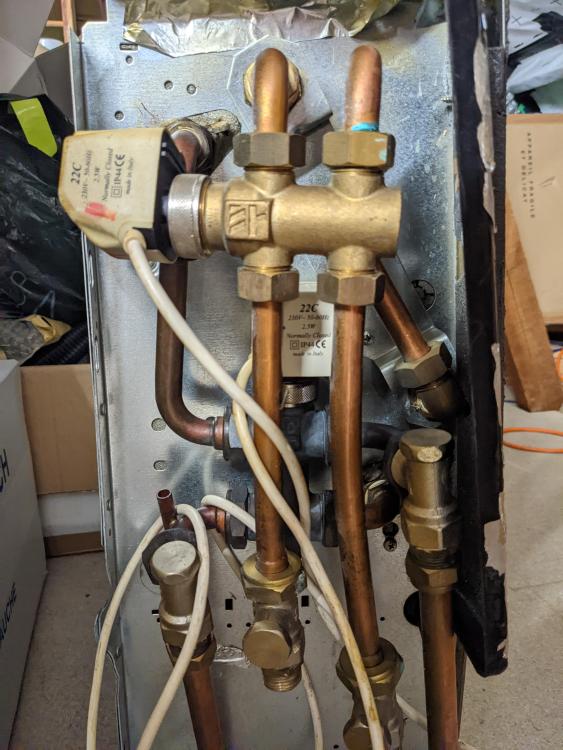
-
No not at all. The ecodan has no idea about humidity that I've seen. (The mobile app may have it in the weather forecast but that is regional and outside so I wouldn't trust it for much). I should start logging indoor RHI too and get an idea what the bounds are it sits in
-
I have been running the UFH cooling at 14ºC I have thermistors embedded in the screed and if they ever drop below 15 I have an automation that shuts the UFH pump off until it comes back up. (And inverse threshold for 25º in winter). This very rarely fires but looks like it was tickled a few times in the last month so I might just tweak the flow temp up to 15. Anyway the floor finishes on top of the screed are alway a few degrees warmer than the sensors/pipes embedded in it.
-
Fan coil unit. On the wet side, you plumb it in just like you would a radiator. (Or even more accurately, like a fan assisted radiator). They have their own thread:
-
Yes, it's rated at 1.5kW but in practice I think it's delivering less than that Unfortunately I only have one FCU - I bought it on a whim before knowing how well it would work or how much we'd need it. In retrospect buying one mahoosive one would have been simpler, given 200mm air motorised dampers are only about £30 ea on aliexpress And, we should have installed larger cross section pipework to the loft.
-
Fan Coil Units for use with a (cooling) ASHP
joth replied to ProDave's topic in Air Source Heat Pumps (ASHP)
Yeah mine was shipped from italy fine (well, some serious box damage, but works fine). but they have nothing in stock anymore https://www.shopclima.it/it/panasonic-paw-fc-d15-1-ventilconvettore-compatto-aquarea-con-attacco-lato-sx-1-5-kw.html -
I see - they do respond to emails on that address for existing cases, but I guess you can't raise new support enquiries that way. I imagine I raised the original request on https://www.solaredge.com/uk/service/support but that's not so easy if you're not already a customer? I'll probably give it a few more weeks before I ping them again. until the local installer company has the Energy Bank in stock I'm in no hurry.
-
My last update from SE was three weeks ago so I doubt you'll get anything more recent than that here. You can always contact them yourself: email support-uk@solaredge.com
-
Fan Coil Units for use with a (cooling) ASHP
joth replied to ProDave's topic in Air Source Heat Pumps (ASHP)
Yeah this is pretty typical, you can find images of all sorts of FCUs online, but finding a distributor/reseller for any of them is a real struggle. e.g. I have this one, rebranded as panasonic https://shop.systemair.com/en/scc202plg2/p402066 And back up thread puntaloos found this Carrier slimline unit (specs) that would fit in a ceiling void. But, unless you're building a block of flats or a large office, the suppliers really aren't interested to talk to you. -
Rainwater Harvesting...
joth replied to Mulberry View's topic in General Self Build & DIY Discussion
Yes but all the plumbing was only£800 of the 5k, and some amount of that would have been charged anyway just to plumb it to an outdoor tap... -
I have it setup this way, UFH downstairs and a fan coil ducted into two bedrooms (so far) upstairs. The house is holding a very nice 20-21°C. The FCU is only 1.5kW not really enough load for a 8.5kW heatpump, wish I'd bought more of them, or a larger one , as they're harder to get now (Brexit and supply chain issues) The ecodan is easy to flip from hearing to cooling mode, and then the two zone "call for heat" dry contacts become call for cooling instead. Using the cloud API or modbus interface you can set the flow temps too, I briefly looked at that level of control possibly to increase efficiency, but it works fine without it.
-
Feel like silly questions but may not be.
joth replied to MikeSharp01's topic in Networks, AV, Security & Automation
No, my presence detectors are ceiling mounted. I'm talking about this sort of light, mounted on the wall about 500mm up from the floor https://www.arrowelectricals.co.uk/dimmable-3w-small-round-recessed-led-wall-light-in-matt-white-ip44-3000k/ Motion activated at night, it's probably guest's favourite thing about the house -
Rainwater Harvesting...
joth replied to Mulberry View's topic in General Self Build & DIY Discussion
FWIW - going the main contractor route and paying the home counties tax (both of which will apply to @puntloos too I believe) the cost increase for submerged RWH tank (vs a standard soak away) was +5000 gbp on the quote, not 1000. That includes the additional much cart away, supply+install of tank, and the additional plumbing & electrics. Needless to say, we ditched the idea and got a couple water butts instead. (Our price was quoted 2019 so who knows where it stands today.) -
Heat pumps: how much efficiency is enough?
joth replied to Garald's topic in Air Source Heat Pumps (ASHP)
UK higher prices may also be due to inefficiency in the supplier and distribution networks, higher margins, and higher taxes (including the so called Green Energy Surcharge that is applied to electricity but not gas here). So exporting more to the UK does not necessarily mean higher revenue heading back to France for the producers. -
Heat pumps: how much efficiency is enough?
joth replied to Garald's topic in Air Source Heat Pumps (ASHP)
This is pretty fundamental to the decision to get a heat pump at all. Heat pumps are expensive, and they're only value over cheap resistive heating is the efficiency gains they offer. In other words it maybe a simple Willis heater is better value than either the heat pumps quoted. Did you get quotes from MCS installers? If so they should have room heat loss calcs and estimate of annual energy demand that you can use to get annual running costs of each system. If not, you can use your EPC to get a rough estimate. Or your SAP or architect. For demand of E kWh / year. "(E / SCOP) x unit_price" Gives you annual running costs (ignoring DHW) E.g. 2000 kWh / 2.5 x 0.3 = £240 per year. -
£1200 RRP!!!! 🤯 No thanks! The reason for 2 immersions for PV divert is in winter there's probably not enough sunlight in the day to heat the whole tank, so if you heat the top half first and when (and only when) that is at target, switch over to heat the bottom half, you have the best odds of achieving some usable DHW from it and possibly avoiding the need to use fossil fuel to top it up. A single immersion at the bottom of the tank, regardless of its size, might only get the whole tank to 40°C on a cloudy day. More useful to have half a tank at 60°C than a whole tepid tank. That's the idea.
-
No they're different, American puts the fridge and the freezer side by side (each full height) with a vertical line splitting them , but French has the fridge (generally double "french" doors) stacked on top of the freezer (typically opening as drawers) https://www.appliancecity.co.uk/news/updates/our-favourite-slim-french-style-fridge-freezers/
-
Apparently Bertazzoni is where it's at, with A+ appliances on the new (??) rating https://www.appliancecity.co.uk/refrigeration/fridge-freezers/?filter_energy-rating=energy-aa otherwise there's a few A-C rated ones https://www.appliancecity.co.uk/refrigeration/fridge-freezers/?filter_energy-rating=energy-a https://www.appliancecity.co.uk/refrigeration/fridge-freezers/?filter_energy-rating=energy-b https://www.appliancecity.co.uk/refrigeration/fridge-freezers/?filter_energy-rating=energy-c
-
Hmm sounds like a "fact" of convenience. Pretty sure Peter will be along soon to say speak to Telford cylinders or someone at cylinders 2 go and they'll make one in any configuration you want. Eddi supports 2 immersion heaters. That said, I also have a limit of just one immersion, in the centre of the 300L UVC, and it does indeed limit the amount of PV divert I can achieve. This was not entirely by choice but a limit of my UVC (Oso Geocoil) does not come in any other option. My hair-brained idea to solve this is, at some point, to install a secondary return circuit, and connect the return (via NRV) into the main water inlet, that way it will agitate the entire tank when sec return is in use, which means on a sunny day I can just run the secondary return pump to increase effective capacity. O/c that does mean increasing unintended internal heat gains from the sec return circuit running on hot days, so it may not be the world's smartest plan. I could use a diverter valve to switch the pump from sec return to the UVC agitation short-circuit route, but that that's all need to be WRAS approved thus pricy. Hence why I've left this whole idea on the back burner. When it's really sunny, I just put on the ASHP to DHW and crank up the target temp to 55ºC which is arguably better due to the >1 COP. (And when I say "I", what I mean is my home control system does that).
-
Fan Coil Units for use with a (cooling) ASHP
joth replied to ProDave's topic in Air Source Heat Pumps (ASHP)
OK answering my own question, if the hot and cold are coming from different sources you want to keep them entirely hydronically separated, to keep expansion vessels, glycol etc completely independent. Yeah makes sense, even if it results in half the coils being in the airflow but idle at any given time. -
Fan Coil Units for use with a (cooling) ASHP
joth replied to ProDave's topic in Air Source Heat Pumps (ASHP)
Cheers. Yeah I was aware in principle of the idea of 4-pipe FCU (I sit underneath a zillion of them in my office per the photo up thread) but wasn't sure if I can easily/sensibly use one in a 2-pipe installation like my house. TBH if there's a diverter valve on the input why bother having 2 coils? just to avoid mixing hot and cold at the change over? Seems more space efficient to have a single coil and divert either the hot loop or cold loop into it according to conditions. (For refrigerant appreciate it's very different, but for a w2a heat exchanger seems simple enough). I should probably search for some more schematics of typical installs 🙂 I did message the seller a couple days ago to ask what the valves and accessories attached to it are in the 3rd photo, but tbh don't expect to get a reply looks like a large scale ebay seller with payment in advance, collection only and no returns, and no responses to enquiries, and some poor reviews. Shame as otherwise I'd probably just take a punt on it. (especially if the price was a bit more at the "couldn't go wrong" end, seeing as collection is very local to me). You advice on buying used it handy though, many thanks! -
Fan Coil Units for use with a (cooling) ASHP
joth replied to ProDave's topic in Air Source Heat Pumps (ASHP)
https://www.ebay.co.uk/itm/265700372361 I was withholding sharing that to avoid bidding against y'all, but on the fence about buying a used FCU at all so no worries if someone else decides to shoot for it. I anyone does, I'll interested how you deal with the 4 water pipe connection? (To confirm I'm not ebaying for cost savings just the lack of availability anywhere else)