

Thorfun
-
Posts
4892 -
Joined
-
Last visited
-
Days Won
36
Everything posted by Thorfun
-
yep. I agree for the road side of the hedge but I still have to do the garden side!
-
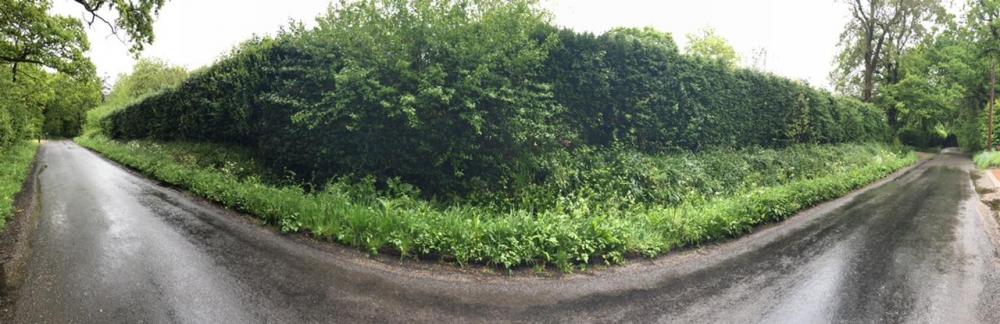
I have a 3m high hedge along 2 long borders (photo below). We currently have an electric hedge trimmer but i’m not sure it’s up to the job so I’m following this thread with interest!
-
I'm no expert and haven't even started building our house yet as we're still waiting on planning permission! but I have had numerous quotes for open panel 140mm timber frame with the idea of fitting the insulation myself to save a substantial amount of money. the external wall makeup you've got there should yield about 0.14W/m2K and is pretty much the exact same make up I'm looking at doing but I might stretch to 80mm of PIR which would take it to about 0.12W/m2K. I'm still not sure about using the propassive osb instead of the VCL as I'm sure you can get excellent air tightness just using the VCL. I guess the propassive has less risk of someone piercing it and creating a hole in your nice airtightness layer when running cables and pipes etc. as such, I'm going to be eagerly watching this thread so I can read what those who actually know what they're talking about say!
-
I did in part. but I'm glad I didn't have to pay for it! I missed a few of the presentations that I wanted to see but I should get a link to the recordings so can view them at a later date.
-
Hi all, not sure if this is of any interest, especially knowing that the NSBRC is pretty much a selling platform for manufacturers, but I've signed up to attend to see if I can glean any information. https://www.nsbrc.co.uk/passiv-workshops
-
can't you use your 'old' NAS as a backup server? unless you're going to sell it of course you might as well put it to good use!
-
sorry, I didn't realise (or simply forgot) that the 1019+ is a 5-drive NAS! in that case I would probably suggest going for 4 x disks in a Raid 10 configuration as he'll benefit from better write AND read performance over RAID 5. then there is still the single drive for the NVR if required, or it can be configured as a hot spare. obviously, if you do configure the 4 x drives as RAID 10 you won't be able to add the extra spare drive if space becomes an issue as RAID 10 needs an even number of disks. Also RAID 10 will basically lose half the number of disks in total storage space. so 4 x 10TB disks in RAID 10 will give 20TB of usable space. whereas RAID 5 will lose only 1 disk and therefore give you 30TB of usable space. personally, I think 20TB should be enough and would rather go for RAID 10 to get the better read and write performance. but, then in that case and if the NVR is going to be part of the RAID 10 disks a 4-disk NAS might be better! see, it's never simple. this is a useful little RAID calculator (http://raid-calculator.com/default.aspx) that will show the benefits of the various RAID levels in case, like me, your memory can't remember them all!
-
and I'm sure I'll learn this as things progress for me.
-
sounds like you're as impatient as I am sometimes! enjoy and I hope it does the job.
-
it's hard to recommend what to get as it's such a personal thing and all depends on how much you want to spend and what it will also be used for etc. i.e. if you're going to use it for a media server using something like Plex for example, are those processors good enough to transcode video on the fly? or would you be better off trying to find something with an i3 or better cpu? I'm not sure how the Atom processors compare with the Celerons either but I'm sure there are benchmarks out there that can tell you. Although the specs seems to allude that if you are going to use it for something like that then the Celeron cpu seems to be able to handle it, assuming you believe the marketing that is! I'd say 2 network ports should be fine and having the 2 M.2 NVMe slots will help as you can add some SSD storage if/when funds become available. I use my slots (albeit via a PCIe card) as an SSD cache to speed up access to the HDDs but I don't know if Synology have this feature. so, all in all, on a basic comparison of those above I'd say the 918+ or 1018+ would suffice. I wouldn't bother with using 4 disks in a Raid 1 configuration though. the chances of 2 disks going in the time it takes to buy a new disk and replace a single failed drive is very slim! if you want a single disk just for the NVR then just configure 3 disks in a Raid 5 configuration leaving the one disk for the NVR. You'll end up with the same total capacity but still have a dedicated drive just for the NVR. if you are worried about losing all your data with 2 drives going then I'd simply advise to get some form of external HDD to backup your critical data to. I do this for my documents and photos. stuff that is too valuable to potentially lose. my movies and music and software can all be replaced but the photos and docs are irreplaceable. hope this helps.
-
Do you mean Horsham District Council? If so, yes.
-
I've honestly not started looking at CCTV cameras or NVRs properly yet so not come across Blue Iris yet. but a quick google and a 64 camera license for £75 doesn't seem too bad. but the cost of the recommended PC will certainly add to that! ? Recommended Specs Intel core i7 with QuickSync for hardware decoding 8GB or more RAM Microsoft Windows 10 64 bit nVIDIA graphics adaptor for efficient screen display 7200+ RPM drives and/or SSD drive but the Minimum Specs is easily doable on a Win 10 VM I guess: Min. Requirements Pentium dual-core or equivalent 2GHz processor or better 2GB or more system RAM Microsoft Windows 7 or newer OS (equivalent server OS as well) One or more USB or Network IP cameras, or an analog capture card with DirectShow drivers it's another thing for me to look in to nearer the time. thanks for the tip.
-
yep. won't argue that. like I said, 'normal' people won't have what I have running! currently have 4 VMs ( 2 x Ubuntu, 1 x OpenSuSe, 1 x Windows 10) on the go running various things segregated on a different VLAN so that if they're compromised my home network and data isn't affected.
-
if you're wanting to do any VMs then 8GB is not enough! especially if they're Windows VMs as Windows is a memory hog. but, I'm a techie and like playing. I'm sure 'normal' people don't need half the things I have. ?♂️
-
and then... but... ? have fun down the rabbit hole.
-
I've read that Synology NASs can be 15%-20% more expensive that Qnap. I know you already have a Synology and I fully understand sticking to what you know but if you're not opposed to changing manufacturer then I'd suggest it's worth checking them out. the web is your friend here and this site (https://nascompares.com) seems to have a lot of information on it about this stuff. remember, research is your friend! spend the time to read as much as you can to make sure you're getting what you need. ?
-
I have 8 x 3TB disks in my NAS (it's a few years old now and larger capacity disks were hugely expensive at the time). I have 3 of them in a Raid 5 configuration for my Documents/Photos/Data etc and the other 5 in a Raid 5 configuration for all of my movies. I honestly can't remember why I did it that way though! was just playing at the time and it stuck. I have also recently added 2 x M.2 500GB SSDs on a PCI slot to give me some SSD caching and also to use for Virtual Machines. over the years as I've started using my NAS more for more than just storing files and media and I'm now running a few VMs on it I'm now running out of memory (it has 16GB) and so when I get my new house (?) I'll be looking to replace it with a rack mounted NAS that can take more memory so I can run more VMs so I'll rethink my disk layout when I get that. But you can split the NAS drives in to whatever configuration you want! so an 8-bay can be 2 x HDDs for CCTV in Raid 0 and then 2 x Raid 5 groups of 3 disks each for other things. or 3 x Raid 1 mirrors. or one big Raid 1+0 group. the choice is yours. whether you want to protect your CCTV footage with redundancy is a choice only you can make. it you're happy to lose the overall space for redundancy then go for it! if you don't want to lose a disk's worth of space then just stripe it and hope nothing fails and, like @joth said, it'd be very bad luck to lose a disk at that point! another option is (assuming Synology can do this, I know Qnap can as I have done it and will do again but my old NAS (another Qnap) is in storage at the moment) is to use real time replication across NASs. so you can use your old NAS to replicate the data to it in real time so you have a live backup of your CCTV footage. anything is possible. Qnap comes with a license for a small number of cameras using their Surveillance Station software (https://www.qnap.com/event/station/en/surveillance-overview-s.php). hope this helps, but I've a feeling it might have confused things and also opened up a can of potentially very expensive worms!
-
I have a Qnap NAS, never had Synology so can't comment on them but the Qnap is great! I have an 8-bay with HDMI out so it's plugged in to my TV and I use Kodi on it to watch movies from the NAS. Qnap also has it's own CCTV software (although I guess Synology does too) but I also have a UniFi network so when I get round to configuring CCTV I have a choice as to go with UniFi products or something else in to the Qnap. gives me options. ? but if you're using the NAS for media and CCTV why not get an 8 bay NAS and use some of the disks just for CCTV and the others for Media so that the CCTV is never touching the media disks? means you kill 2 birds with one stone and don't need a dedicated NVR but also don't have the CCTV footage hammering the media disks. just a thought.
-
did you ever get quotes for the foundations without the basement? if not, any idea how much the foundations would've been? therefore the extra cost of the basement would be £X as you would've needed the foundations anyway.
-
I look forward to reading peoples responses to this! Following with interest...
-
Home automation server/system makes?
Thorfun replied to gc100's topic in Networks, AV, Security & Automation
thanks for the videos I will watch with glee! no self programming in C4, but they do offer an if/when type user interface to allow basic automation without the need for a dealer. but it is very much a closed system. I think, for me, it'll come down to comparing costs, ease of use, expandability, functionality, aesthetics and reliability. some form of matrix will need to be created to compare. -
thanks @Ferdinand. I agree, it is an interesting thread! I agree about the tactic to potentially define the basement as storage space, the same can be done with the studio and just board it out post completion to make it usable and we will consider this moving forward if the other discussions don't bare any fruit. but my point on these things and tactics are that they're a joke. and if it can be done after the fact why not just allow it now?
-
Cor! That seemed to escalate quicker than the film we just watched (Extraction with Chris Hemsworth On Netflix). ?
-
thanks @Jeremy Harris. I agree about the basement. if it gets to it maybe I can ask the planning consultant if we can consider adding the basement afterwards but that is the sort of pettiness that I was alluding to in my blog post! I could put in for a smaller house with no annexe or studio or garden room and then build them under PD afterwards (assuming they don't take our PD away that is) or put a new planning application in for extensions but what a bureaucratic farce! just allow it right off the bat to save all the faffing around.
-
thanks for the suggestion. our planning consultant seems to think that it shouldn't need to go to committee but, yes, it is another option.