Skip to content
View in the app

A better way to browse. Learn more.

BuildHub.org.uk

A full-screen app on your home screen with push notifications, badges and more.

To install this app on iOS and iPadOS
  1. Tap the Share icon in Safari
  2. Scroll the menu and tap Add to Home Screen.
  3. Tap Add in the top-right corner.
To install this app on Android
  1. Tap the 3-dot menu (⋮) in the top-right corner of the browser.
  2. Tap Add to Home screen or Install app.
  3. Confirm by tapping Install.

Planning

(0 reviews)

I used the knowledge of this forum to help me work out what i wanted to build. I was told repeatedly to knock down and re-build, and i kinda wish i'd of gone down that route now, but i decided to stick with what i had and make it work. With that said, i'm not paying much VAT, i'm doing a lot of the work myself, and the trades i do employ aren't VAT registered anyway. The 0% VAT incentive of going new build wouldn't have been quite as much as a game changer as i thought it might be.


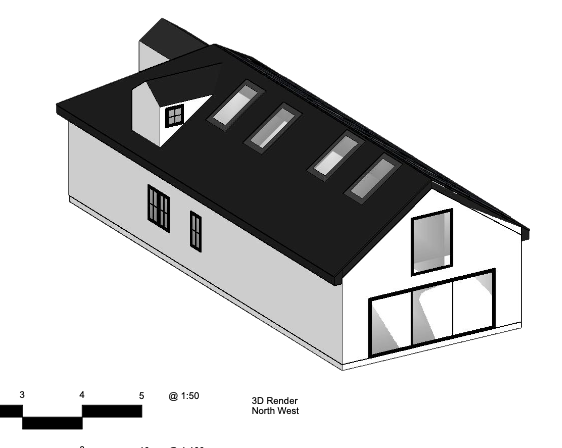
I had a bit of back and forth with the planners over 2 things, the height of the building, and the positioning of the rooflights.

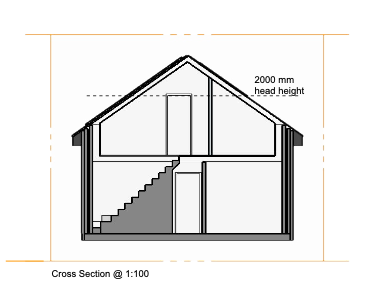
We managed to settle on raising the eaves approx 1m to give way more usable space upstairs, and a ridge height equal to the neighbours.

The rooflights had to be positioned at 1.7m above floor as to not overlook the neighbours, but i wanted to use the rooflight in the 3rd bedroom as a fire escape. In the end we managed to work in a dormer to that room, and position normal windows facing front and back at 1.1m for fire escape. (although, i think this is going to be quite difficult to work into the roof in practice, so idea's here would be welcome!)


In the end, after 3 months, we've ended up with approval.
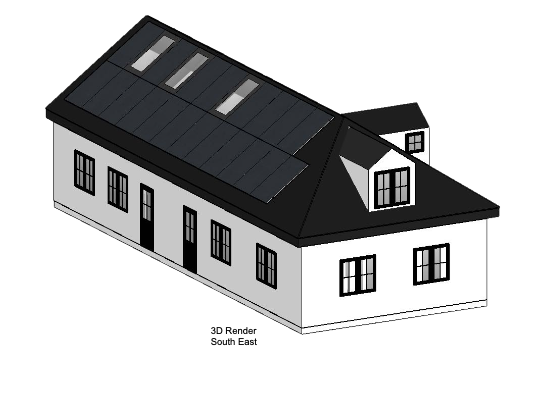
 

Screenshot2024-01-04at21_26_13.png.075190eb3a78bc6c93082815add852bf.pngScreenshot2024-01-04at21_26_18.png.2fcc3d86d7c133994a2dcb9c09c32d41.pngScreenshot2024-01-04at21_26_20.png.6f4336532071e937d753d964767af867.pngScreenshot2024-01-04at21_26_26.thumb.png.e15ea20ad76f190fff8b5f8970b6456e.pngScreenshot2024-01-04at21_26_32.thumb.png.186f0344440fbd3ed896bde774d907ce.png

1 Comment

Recommended Comments

LiamJones

Members

I should add, i did all the drawings myself using SketchUp and Layout. 

Account

Navigation

Search

Search

Configure browser push notifications

Chrome (Android)
  1. Tap the lock icon next to the address bar.
  2. Tap Permissions → Notifications.
  3. Adjust your preference.
Chrome (Desktop)
  1. Click the padlock icon in the address bar.
  2. Select Site settings.
  3. Find Notifications and adjust your preference.