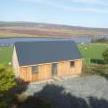
June 22, 20233 yr Context- I currently live on a boat using PV and a LFP battery for almost all of my energy needs. It works really well and I'm totally happy with my off grid lifestyle. But around this time next year I'll be moving back in to my house, in NW Scotland. I've become rather fond of not having to pay for energy, and I'm keen to do some upgrades to the house to incorporate renewables. But I don't really know where to start with grid tied systems. I've got space for PV- the two sides of the roof face E&W but I have room for a ground mounted array facing S too. I also have a pretty good shot at wind power, with an estimated 5m/s or more average wind speed. Thirdly, there's a small watercourse running through the ground, although it's intermittent and dries away to nothing in the summer. My rough plan is to build up some since of microgeneration, mainly to feed/offfset the DHW and A2A heating. I'm also keen to eventually get an EV. So, what are the basics that I need to know? If I want to do this without a battery, what does that look like? What are the advantages of adding storage? And can I use an EV as storage?? (I'm thinking about one that supports V2L) I should also mention that I'm more than happy to get very hands on with it all. I built my LFP battery from bare cells and designed/installed the entire system from scratch.




Create an account or sign in to comment