

bertybuttface
-
Posts
51 -
Joined
-
Last visited
Everything posted by bertybuttface
-
SolarEdge + StorEdge + LG RESU - anyone done it?
bertybuttface replied to joth's topic in Energy Storage
It is an extra addon, I can't remember where I read it but I read that the battery won't provide full power or fully discharge if its using a wired connection so I bought one of these: https://midsummerwholesale.co.uk/buy/storedge/solaredge-energybank-energy-net -
SolarEdge + StorEdge + LG RESU - anyone done it?
bertybuttface replied to joth's topic in Energy Storage
I'm not connecting directly to the battery with Modbus. I connect to the inverter with Modbus. If the screw terminals are in a silly place you should be able to pull out the whole connector (the green bit). The Battery and the Inverter are talking with "SolarEdge Energy Net for SetApp inverter" which to the best of my knowledge is a Zigbee based protocol. Apologies for the delayed response. -
SolarEdge + StorEdge + LG RESU - anyone done it?
bertybuttface replied to joth's topic in Energy Storage
You can take complete control of the device via Modbus if you get your installer to turn on Modbus TCP. It sounds more difficult than it actually is. 1. Get a raspberry Pi. 2. Install home assistant https://www.home-assistant.io 3. Install the HACS addon. 4. Install this addon using HACS https://github.com/binsentsu/home-assistant-solaredge-modbus If you get any worries with it let me know. -
SolarEdge + StorEdge + LG RESU - anyone done it?
bertybuttface replied to joth's topic in Energy Storage
Maybe I got lucky but yes for me it has been easy to fit (DIY) and easy to use. Do I enjoy messing with Modbus - a protocol from the 1970s? Hell no. Does it work? Yeah, does exactly what I want it to. I have full local stats access. If you don't need that then you don't even need to mess with Modbus. -
SolarEdge + StorEdge + LG RESU - anyone done it?
bertybuttface replied to joth's topic in Energy Storage
What is your understanding of the warranty situation with the battery if you are charging it from the AC? -
SolarEdge + StorEdge + LG RESU - anyone done it?
bertybuttface replied to joth's topic in Energy Storage
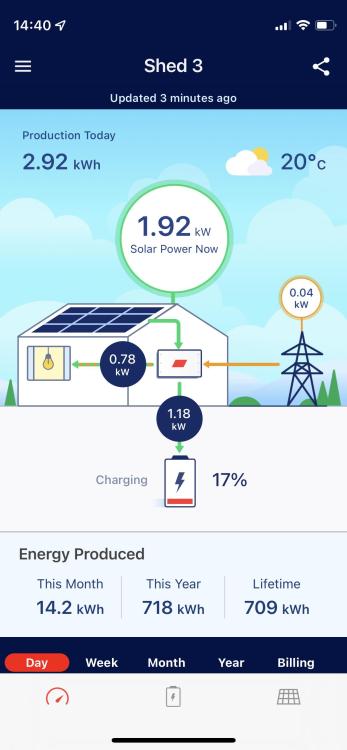
mySolarEdge is the consumer facing app, make sure your installer leaves you with access to "SetApp" and "SolarEdge" apps. Here are some screenshots from both apps in case it helps. What do you have fitted so far? Battery, inverter and meter?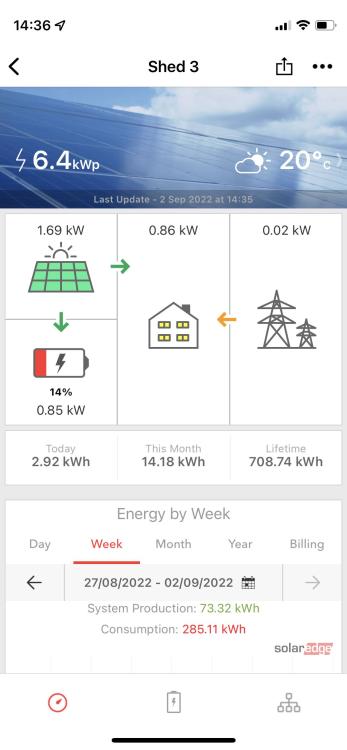
-
Found the backup interface for preorder in the EU (with a datasheet). Previously only saw the AU and US one so hopefully this is progress: https://www.mg-solar-shop.com/solaredge-bi-eu3p-home-backup-interface-for-home-hub-inverters This site is saying February 2023 for stock: https://www.inutec-int.com/us/solaredge-home-backup-interface-bi-eu3p.html
-
SolarEdge + StorEdge + LG RESU - anyone done it?
bertybuttface replied to joth's topic in Energy Storage
Unfortunately a couple of times a year, they are normally either almost instant or take an hour or so to turn back on. Never had anything longer. That said I have devices that must stay on that a UPS isn't manly enough to power. I currently keep a pair of Jackery 1000s for this but I'd like to have something more substantial and that doesn't rely on me remembering to charge it. -
SolarEdge + StorEdge + LG RESU - anyone done it?
bertybuttface replied to joth's topic in Energy Storage
I was trying to find a way to keep the power on during a power cut. It seems this isn't possible with a SolarEdge Energy Bank right now in the UK. I'm currently investigating whether a smaller AC coupled system connected by my meter with the ability to separate the house off into an "island" will let the two systems work together in unison. -
SolarEdge + StorEdge + LG RESU - anyone done it?
bertybuttface replied to joth's topic in Energy Storage
I must say I had none of the problems this person is experiencing. If you have any specific issues feel free to tag me, if I know the answer I will try and provide it to you. Good luck! -
Hello, Does anybody know how to make SolarEdge inverters work when the power is off and the house is isolated from the grid? I've spoken with an electrician who said we would need to ensure the house was fully isolated before doing this so we don't fry a linesman or anyone else for that matter. That said he was unable to help with the SolarEdge specific part, we found a "Backup Interface" but it is only available in North America. Has anybody done this? Can someone nudge me in the right direction? Happy to report back with findings like the last mini adventure with the battery itself. I'm using a Solar Edge Energy Bank Battery with a SE8000H. Thanks a lot, BB
-
SolarEdge + StorEdge + LG RESU - anyone done it?
bertybuttface replied to joth's topic in Energy Storage
SDM-230 works well with a Modbus to Ethernet adapter and solaredge-modbus-proxy. -
SolarEdge + StorEdge + LG RESU - anyone done it?
bertybuttface replied to joth's topic in Energy Storage
I have no StorEdge interface, simply the Energy Bank Battery and the Inverter. Perhaps the StorEdge interface is for the older non SetApp inverters (with the LCD screens)? -
SolarEdge + StorEdge + LG RESU - anyone done it?
bertybuttface replied to joth's topic in Energy Storage
Yeah pretty much and some sick masochistic desire to overcomplicate things because life isn't quite hard enough. -
SolarEdge + StorEdge + LG RESU - anyone done it?
bertybuttface replied to joth's topic in Energy Storage
With the CT clamp (an extra £40ish) the SolarEdge Energy Monitor is £235. I'd then need to run a wire from the fusebox at the front of the house all the way to the shed at the back of the house, it would either need to be surface mount on the outside or a real pain to run hidden. In which case I'd need 2 x wireless gateways anyway. That would be another £80 so I'd be looking at £320 or so. We also don't have a socket in the meter / consumer board cupboard so I'd need an electrician to run a socket anyway, he might as well connect a meter up whilst he is here. If this doesn't work I will try the SolarEdge Energy Monitor with 2 x Wi-Fi Modbus gateways and return the SDM-230. If it still doesn't work I'll run a cable surface mount. I picked the SDM-230 as I saw others having success with it. I think it will only be a couple of percent more accurate than CT clamps but still a slight consideration. It also means I don't have to worry about getting this power meter data back out from the SolarEdge inverter and fed to the rest of the house. -
SolarEdge + StorEdge + LG RESU - anyone done it?
bertybuttface replied to joth's topic in Energy Storage
SE8000H, no storedge interface, SolarEdge Battery Bank (the big heavy bugger), Eastron SDM-230 meter being fitted this week (couldn't fit today as we need metal box apparently). The Eastron SDM-230 is not compatible directly with SolarEdge inverters so I will be using a bit of software (https://github.com/nmakel/solaredge_meterproxy) to convert the values. This doesn't bother me as I have to use a wireless Modbus TCP gateway anyway because running an RS-485 cable from inverter to meter would be harder. This runs on a Raspberry Pi with USB RS-485. I couldn't find a meter that directly fitted my requirements for a reasonable price: 1. Compatible with SolarEdge (ideally without any proxies, not just SolarEdge branded stuff other stuff works). 2. Direct connect not CT clamps. 3. 100A single phase. 4. Modbus TCP (we need to send this wirelessly as running a cable would be hard) I have the Raspberry Pi in the shed with the inverter anyway for monitoring purposed so I figured the SM-230 with a DIN mounted Wi-Fi Modbus TCP proxy would nearly tick all of the above boxes. The Raspberry Pi simply connects to the inverted via RS-485 and the meter via Modbus TCP. The non solar edge hardware I'm using in full: 1. Eastron SDM-230 (£50 online) 2. Waveshare RS485 to WIFI/Ethernet,Ethernet to WIFI Converter Module,Rail-Mount RS485 Serial Server, Modbus MQTT Gateway (£40 online) 3. Raspberry Pi (cost me £30 but can vary these days, it might be possible to use an Arduino with MicroPython which would be cheaper and use less power) 4. Waveshare Industrial USB to RS485 Converter with original FT232RL Built in Embedded Protection Circuits (£17) All told about £140 worth of hardware but in return I get: 1. Very accurate power monitoring, fully local, fed into wider home automation system by Home Assistant. No cloud crap, no smart meter that can be remotely disabled. Dumb meter. 2. The system can be set not to export (my meter currently charges me for export as if it were import) and the battery can know when to charge / discharge. 3. Regular (15 second or less intervals) and complete information about all the components in the system e.g. battery, inverter, panels. All fed into Grafana. 4. Hopefully I will get control of when the battery is charging or its various discharge modes without being on the SetApp Wifi. Remember the metering part of this still a work in progress, I cannot confirm this will work until I have the meter fitted Please do not consider me an expert with any of this I'm just trying to make this work. I welcome any questions, suggestions or constructive feedback. Anything you do is at your own risk of course. Good luck. -
SolarEdge + StorEdge + LG RESU - anyone done it?
bertybuttface replied to joth's topic in Energy Storage
A different plugin might already offer this functionality, if you skim through this constants file (even if you aren't a programmer) you will see roughly what options are available: https://github.com/binsentsu/home-assistant-solaredge-modbus/blob/master/custom_components/solaredge_modbus/const.py -
SolarEdge + StorEdge + LG RESU - anyone done it?
bertybuttface replied to joth's topic in Energy Storage
It is a little long winded but it seems stable enough, I'm using Home Assistant (https://www.home-assistant.io) with 4 plugins: 1. Grafana plugin (https://github.com/hassio-addons/addon-grafana) 2. InfluxDb plugin (https://github.com/hassio-addons/addon-influxdb) 3. HACS - unofficial community app store, needed to install the next plugin (https://hacs.xyz) 4. Solaredge Modbus Multi (https://github.com/WillCodeForCats/solaredge-modbus-multi) I turned on Modbus TCP on the inverter and connected it to my network with the wired LAN port. This gives it an IP that you connect to with plugin 4 above. Right now I can only see data not control anything and the plugin does still use polling, I have the polling interval set to 15 seconds and it seems to be fine. Tomorrow I'm getting an SM-230 meter fitted, I will use https://github.com/nmakel/solaredge_meterproxy to get the data into the inverter via a wireless Modbus gateway and a Raspberry Pi connected to the inverter with a RS-485 USB interface. More details to follow. At this point I will have direct Modbus access to the inverter (not TCP) as this is needed to set any values. We should be able to find out what values to set. The above should let me tell the inverter and battery to maximise self consumption. As for charging from grid at cheap rate that is next. Let me know what you find. -
SolarEdge + StorEdge + LG RESU - anyone done it?
bertybuttface replied to joth's topic in Energy Storage
Sorry for the repeated small replies but I can't edit old replies. The battery has been charging all day.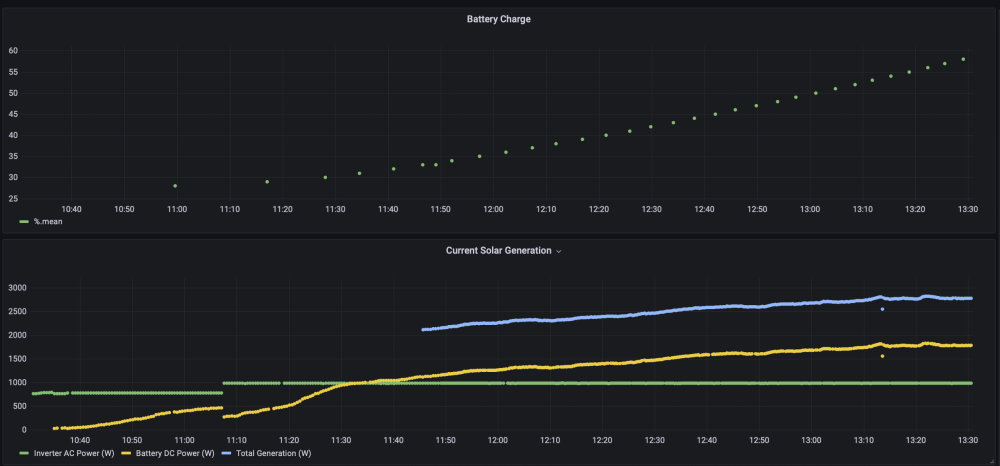
-
SolarEdge + StorEdge + LG RESU - anyone done it?
bertybuttface replied to joth's topic in Energy Storage
Ok looks like it is charging, all the data returned by the inverter looks correct. I assume it won't discharge until I have metering sorted tomorrow. If anyone has any questions they want answered please let me know. There is very little info out there about this battery and compatibility with various inverters. -
SolarEdge + StorEdge + LG RESU - anyone done it?
bertybuttface replied to joth's topic in Energy Storage
Ok got the inverter chatting to the battery via the Energy Net addon board. Looks like it is all working, will find out for sure when the sun comes out tomorrow. -
SolarEdge + StorEdge + LG RESU - anyone done it?
bertybuttface replied to joth's topic in Energy Storage
It is on the wall! (expletive deleted) is it heavy. Once I've finished apologising to everyone for seriously losing my blob trying to get it on the wall I'll be hooking everything up over the weekend hopefully, will report back. In the interim I have got a Modbus connection with the inverter working. This feeds directly into home assistant. Hopefully the battery data will too. I'll also be hooking an Eastron SDM 230 meter up on Tuesday and using https://github.com/nmakel/solaredge_meterproxy to get the data into the inverter via the Wi-Fi, a pair of Raspberry Pi's and Modbus USB interfaces. -
SolarEdge + StorEdge + LG RESU - anyone done it?
bertybuttface replied to joth's topic in Energy Storage
Sorry bud no news from me so far, still not lifted this thing onto the wall yet, hoping to get it sorted next month. -
SolarEdge + StorEdge + LG RESU - anyone done it?
bertybuttface replied to joth's topic in Energy Storage
Thanks a lot for chasing that up, officially compatible sounds like it might work but just be unsupported. I'll give it a go and report back. I guess it must just be working in Australia, perhaps some sort of regulatory restrictions / delays with UK / EU / US? -
SolarEdge + StorEdge + LG RESU - anyone done it?
bertybuttface replied to joth's topic in Energy Storage
Thanks for the fast reply, if it is not too much of a pain would you mind asking on that ticket what they meant and if things are now supported? If its closed already no worries I'll raise a ticket. I have both units here I'm just struggling to move this thing, it is very heavy! Once it is on the wall I might just plug it in and give it a go. I bet with the right poking via modbus it could be made to work.